pen <- palmerpenguins::penguins
library(gtsummary)
library(tidyverse)
library(performance) # for check_model.

# Additional packages that you will have to install but don't need to load
# see (for check_model)
# webshot2 (for gtsave)How do I….
This page is dedicated to showing example code for selected tasks.
1. Change your variable names
1.1 Making easy to use names
When your raw data is read in with really long, ugly, contains special characters or generally or hard to use variable names.
names(penguins_raw) [1] "studyName" "Sample Number" "Species"
[4] "Region" "Island" "Stage"
[7] "Individual ID" "Clutch Completion" "Date Egg"
[10] "Culmen Length (mm)" "Culmen Depth (mm)" "Flipper Length (mm)"
[13] "Body Mass (g)" "Sex" "Delta 15 N (o/oo)"
[16] "Delta 13 C (o/oo)" "Comments" We can use the clean_names() function from the janitor package to convert all variable names to clean R names.
penguins_raw |> janitor::clean_names() |> names() [1] "study_name" "sample_number" "species"
[4] "region" "island" "stage"
[7] "individual_id" "clutch_completion" "date_egg"
[10] "culmen_length_mm" "culmen_depth_mm" "flipper_length_mm"
[13] "body_mass_g" "sex" "delta_15_n_o_oo"
[16] "delta_13_c_o_oo" "comments" 1.2 Making nice display names using select
Now the reverse. When getting ready to plot, or create a table for other people to see we don’t want to show R code names like bill_depth_mm.
We can select the variables of interest and rename them nicely using select. Note any name with a space in it has to be surrounded by a back tick (to the left of the 1 key)
analysis.data <- pen %>%
  select(`Bill Depth (mm)` = bill_depth_mm,
         `Bill Length (mm)` = bill_length_mm,
         Sex = sex, Species = species)
names(analysis.data)
[1] "Bill Depth (mm)" "Bill Length (mm)" "Sex" "Species" 2. Fixing Table Summary
2.1 Summarize a continuous variable across a categorical variable with many levels?
ImportantProblem
Sometimes the categorical variable has so many levels, or the level names are so long that the table wraps off the edge of the PDF and is unreadable.
pen |>
  tbl_summary(
  include = bill_length_mm,
  by = species
)| Characteristic | Adelie N = 1521 |
Chinstrap N = 681 |
Gentoo N = 1241 |
|---|---|---|---|
| bill_length_mm | 38.8 (36.7, 40.8) | 49.6 (46.3, 51.2) | 47.3 (45.3, 49.6) |
| Unknown | 1 | 0 | 1 |
| 1 Median (Q1, Q3) | |||
TipSolution
There is no easy way to rotate or “transpose” a gtsummary object. One approach is to manually use a “split-apply-combine” method.
- we “map” a function
\()across all levels ofpen$speciesindexing bys - For
speciess, we create atbl_summary - where we modify the header to have a common name of the numeric variable in question
- And change the label of the row to the species level
s - Then we
stackthe tables together, and replace theheaderwith the name of the Categorical variable
purrr::map(levels(pen$species), \(s)
  pen |>
    filter(species == s) |>
    tbl_summary(include = bill_length_mm, missing = "no") |>
    modify_header(all_stat_cols() ~ "**Bill length (mm)**") |>
    modify_table_body(~ mutate(.x, label = s))
  ) |>
  tbl_stack(group_header = NULL) |>
modify_header(label ~ "**Species**")| Species | Bill length (mm)1 |
|---|---|
| Adelie | 38.80 (36.70, 40.80) |
| Chinstrap | 49.6 (46.3, 51.2) |
| Gentoo | 47.30 (45.30, 49.60) |
| 1 Median (Q1, Q3) | |
Another approach is to use dplyr to group_by and summarize, then pass the data frame into kable from the knitr package to make a nicer table.
- Create your summary statistics using
group_byandsummarize. - Create a new variable as the column header, using back ticks to allow for a “non standard” variable name.
- Create this new variable by
paste’ing the value of the mean and sd together with parenthesis, after rounding to 2 digits. selectthe variables you want to display- Pass it to
kable()
pen |>
  group_by(species) |>
  summarize(mean=mean(bill_length_mm, na.rm=TRUE),
            sd = sd(bill_length_mm, na.rm=TRUE)) |>
  mutate(`Bill Length(mm)` = paste0(round(mean,2), " (", round(sd,2), ")")) |>
  select(Species= species, `Bill Length(mm)`) |>
knitr::kable()| Species | Bill Length(mm) |
|---|---|
| Adelie | 38.79 (2.66) |
| Chinstrap | 48.83 (3.34) |
| Gentoo | 47.5 (3.08) |
See the kableExtra vignette for additional references on how to prettify this table.
2.2 Force data type in your summary table
ImportantProblem
tbl_summary sometimes thinks integer data with few distinct values is a categorical variable and so will return N(%) instead of mean (SD).
pen_example |>
  tbl_summary(
  include = c(body_mass_g, sex)
)| Characteristic | N = 201 |
|---|---|
| body_mass_g | |
| 3175 | 2 (10%) |
| 3475 | 3 (15%) |
| 3600 | 7 (35%) |
| 3750 | 5 (25%) |
| 5350 | 3 (15%) |
| sex | |
| female | 9 (47%) |
| male | 10 (53%) |
| Unknown | 1 |
| 1 n (%) | |
TipSolution
Specify the correct data type in the tbl_summary function directly.
pen_example |>
  tbl_summary(
  include = c(body_mass_g, sex),
  type = list(body_mass_g ~ "continuous"),
  statistic = list(body_mass_g ~ "{mean} ({sd})")
)| Characteristic | N = 201 |
|---|---|
| body_mass_g | 3,839 (672) |
| sex | |
| female | 9 (47%) |
| male | 10 (53%) |
| Unknown | 1 |
| 1 Mean (SD); n (%) | |
2.3 Stop it from floating to the top of the page
This happens in PDF/LaTeX output, where LaTeX treats tables as floats and places them wherever it thinks they fit. You fix it by forcing the H (“here”) position. This takes 2 steps:
- In the code chunk where your table is created, add
#| tbl-pos: Has a code chunk option:
#| tbl-pos: H

tbl_summary(your code here)- In the YAML header (top of your page where you specify your author name, date etc) you’ll add additional information. Copy and paste this code - YAML headers are very finicky about spacing.
Change from:
format: pdfto
format:
  pdf:
    include-in-header:
      text: |
        \usepackage{float}
        \floatplacement{table}{H}
2.4 Word wrap your long variable labels.
If your table runs off the page due to your question text being really long
| Characteristic | N = 9081 |
|---|---|
| does caregiving have negative effect on your physical health? | |
| 1 | 409 (46%) |
| 2 | 346 (39%) |
| 3 | 85 (9.5%) |
| 4 | 58 (6.5%) |
| Unknown | 10 |
| does caregiving cause difficulties in your relationship with your family? | |
| 1 | 626 (69%) |
| 2 | 211 (23%) |
| 3 | 50 (5.5%) |
| 4 | 15 (1.7%) |
| Unknown | 6 |
| does caregiving cause financial difficulties? | |
| 1 | 713 (79%) |
| 2 | 131 (15%) |
| 3 | 39 (4.3%) |
| 4 | 17 (1.9%) |
| Unknown | 8 |
| 1 n (%) | |
Convert your table to a “flex table” by piping it into as_flex_table() and then controlling the width using flextable::width(j = "label", width = 3) where you can play around with the value of width.
efc |>
  select(c85cop4, c86cop5, c87cop6) |>
  tbl_summary() |>
  as_flex_table() |>
  flextable::width(j = "label", width = 3)
Characteristic | N = 9081 |
|---|---|
does caregiving have negative effect on your physical health? | |
1 | 409 (46%) |
2 | 346 (39%) |
3 | 85 (9.5%) |
4 | 58 (6.5%) |
Unknown | 10 |
does caregiving cause difficulties in your relationship with your family? | |
1 | 626 (69%) |
2 | 211 (23%) |
3 | 50 (5.5%) |
4 | 15 (1.7%) |
Unknown | 6 |
does caregiving cause financial difficulties? | |
1 | 713 (79%) |
2 | 131 (15%) |
3 | 39 (4.3%) |
4 | 17 (1.9%) |
Unknown | 8 |
1n (%) | |
2.5 Apply a good theme to your table
Run theme_gtsummary_compact() once before building tables. It will stay on for the session. See
theme_gtsummary_compact()
efc |>
  select(c85cop4, c86cop5, c87cop6) |>
  tbl_summary() |>
  as_flex_table() |>
  flextable::width(j = "label", width = 3)
Characteristic | N = 9081 |
|---|---|
does caregiving have negative effect on your physical health? | |
1 | 409 (46%) |
2 | 346 (39%) |
3 | 85 (9.5%) |
4 | 58 (6.5%) |
Unknown | 10 |
does caregiving cause difficulties in your relationship with your family? | |
1 | 626 (69%) |
2 | 211 (23%) |
3 | 50 (5.5%) |
4 | 15 (1.7%) |
Unknown | 6 |
does caregiving cause financial difficulties? | |
1 | 713 (79%) |
2 | 131 (15%) |
3 | 39 (4.3%) |
4 | 17 (1.9%) |
Unknown | 8 |
1n (%) | |
3 Regression Tables
3.1 Multiple regression models in the same table
Fit each model separately, and save the result of the tbl_regression as an object.
model.1 <- lm(`Bill Depth (mm)` ~ `Bill Length (mm)` + Sex, data=analysis.data) |>
  tbl_regression() |>
  add_glance_table(include = c(adj.r.squared, nobs))

model.2 <- lm(`Bill Depth (mm)` ~ `Bill Length (mm)` + Sex + Species, data=analysis.data) |>
  tbl_regression() |>
  add_glance_table(include = c(adj.r.squared, nobs))

tbl_merge(
  list(model.1, model.2),
  tab_spanner = c("**Model 1**", "**Model 2**")
) |>
  modify_table_body(
    ~arrange(.x, row_type == "glance_statistic")
)| Characteristic |
Model 1
|
Model 2
|
||||
|---|---|---|---|---|---|---|
| Beta | 95% CI | p-value | Beta | 95% CI | p-value | |
| Bill Length (mm) | -0.15 | -0.18, -0.11 | <0.001 | 0.07 | 0.03, 0.11 | <0.001 |
| Sex | ||||||
| female | — | — | — | — | ||
| male | 2.0 | 1.6, 2.4 | <0.001 | 1.3 | 1.0, 1.5 | <0.001 |
| Species | ||||||
| Adelie | — | — | ||||
| Chinstrap | -0.61 | -1.1, -0.16 | 0.008 | |||
| Gentoo | -4.0 | -4.4, -3.6 | <0.001 | |||
| Adjusted R² | 0.279 | 0.827 | ||||
| No. Obs. | 333 | 333 | ||||
| Abbreviation: CI = Confidence Interval | ||||||
3.2 Exporting regression model results
Make it look good first.
model <- lm(`Bill Depth (mm)` ~ `Bill Length (mm)` + Sex, data=analysis.data)

# Set a theme
theme_gtsummary_compact()
model %>%
  tbl_regression() %>%
add_glance_table(include = c(adj.r.squared, nobs))| Characteristic | Beta | 95% CI | p-value |
|---|---|---|---|
| Bill Length (mm) | -0.15 | -0.18, -0.11 | <0.001 |
| Sex | |||
| female | — | — | |
| male | 2.0 | 1.6, 2.4 | <0.001 |
| Adjusted R² | 0.279 | ||
| No. Obs. | 333 | ||
| Abbreviation: CI = Confidence Interval | |||
See the vignette for more theme options.
Then add the code to export it as an image.
model %>%
  tbl_regression() %>%
  add_glance_table(include = c(adj.r.squared, nobs)) %>%
  as_gt() %>%
  gt::gtsave(filename = "model_results.png", expand = 10)
WarningInstructions for JupyterHub
The above code uses the webshot2 package to convert the model results to a png through an intermediary html file using Chrome. This won’t work when using JupyterHub/RStudio in the cloud.
Here is a solution that will write it directly to a powerpoint file, at a size that should look fine when imported into your poster slide. This requires the packages flextable and officer - these may already be installed.
library(gtsummary)
library(flextable)
library(officer)

# fit model
tbl <- lm(bill_length_mm ~ body_mass_g, data = pen) |>
  tbl_regression() |>
  add_glance_table(include = c(adj.r.squared, nobs)) |>
  # convert to flex table
  as_flex_table() |>
  # set font size
  fontsize(size = 24, part = "all") |>
  autofit()

# create a blank powerpoint file
prs <- read_pptx() |>
  add_slide(layout = "Blank", master = "Office Theme") |>
  # add the table as a slide
  ph_with(tbl, location = ph_location(left = 0.5, top = 0.5, width = 9, height = 4))

# write this powerpoint file to your working directory
print(prs, target = "model_results.pptx")
3.3 Log linear model + gtsummary
If you fit a log-linear model using lm(log(y)~x), tbl_regression doesn’t want to auto-exponentiate your coefficients and CI for you. Here is the workaround
# not run
tbl <-
  lm(log(mpg) ~ am, mtcars) |>
  tbl_regression()

# run this function to see the underlying column names in `tbl$table_body`
# show_header_names(tbl)

tbl |>
  # remove character version of 95% CI
  modify_column_hide(ci) |>
  # exponentiate the regression estimates
  modify_table_body(
    \(x) x |> mutate(across(c(estimate, conf.low, conf.high), exp))
  ) |>
  # merge numeric LB and UB together to display in table
  modify_column_merge(pattern = "{conf.low}, {conf.high}", rows = !is.na(estimate)) |>
  modify_header(conf.low = "**95% CI**") |>
  as_kable()
ref: Stack Overflow
4. Plots
4.1 Export to a file
Make it look good first.
ggplot(analysis.data, aes(x=`Bill Length (mm)`,
                          y = `Bill Depth (mm)`,
                          color = Sex)) +
  geom_point() +
  theme_bw(base_size=18)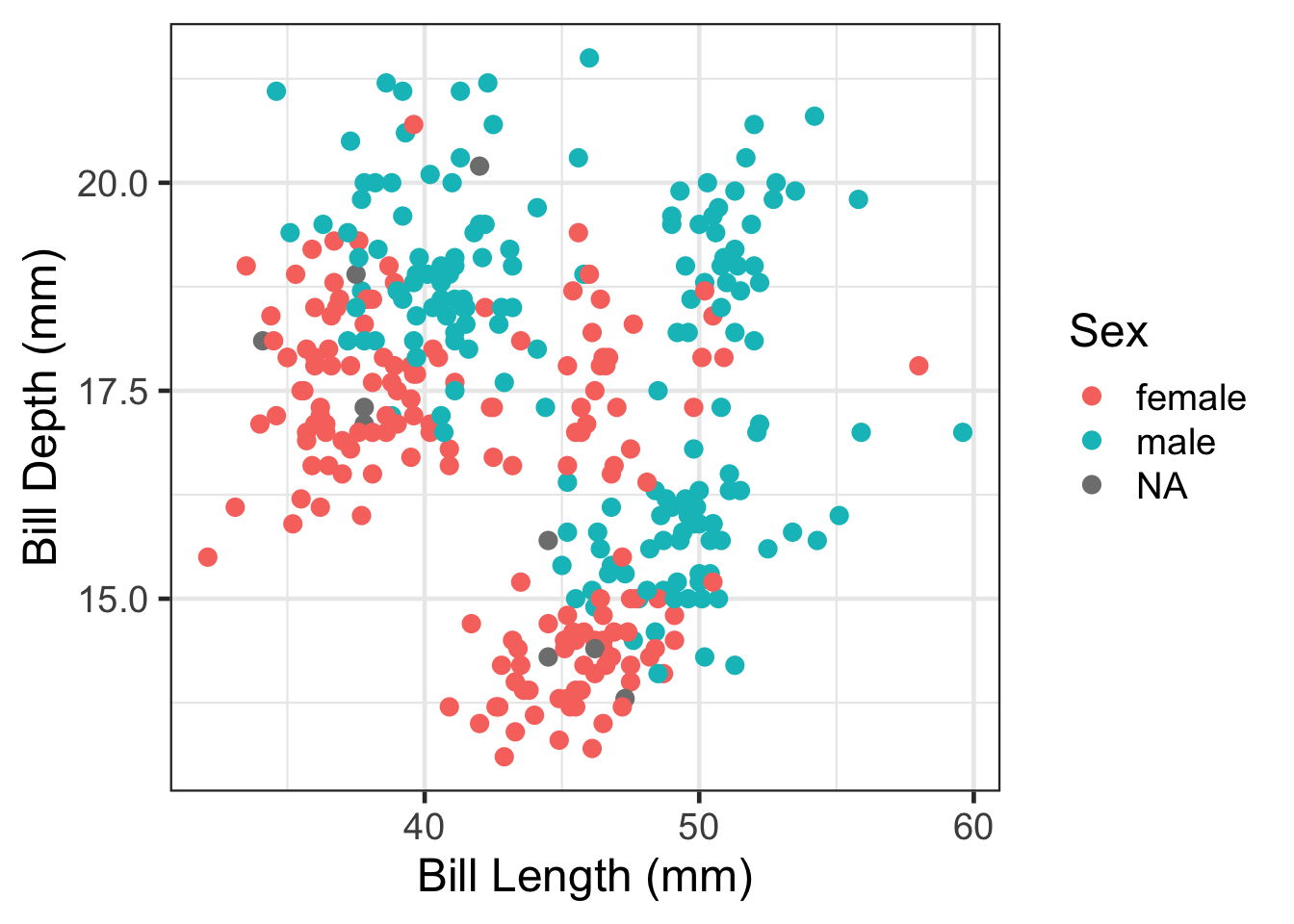
Then save. Import this into your poster file and adjust the width and height as needed.
ggplot(analysis.data, aes(x=`Bill Length (mm)`,
                          y = `Bill Depth (mm)`,
                          color = Sex)) +
  geom_point() +
  theme_bw(base_size=18)
  ggsave(filename = "myplot.png",  plot = get_last_plot(),
         width = 6, height = 6, units = "in")
4.2 Remove a legend
ggplot(pen, aes(x=island, fill = island)) + geom_bar() +
  theme(legend.position="none")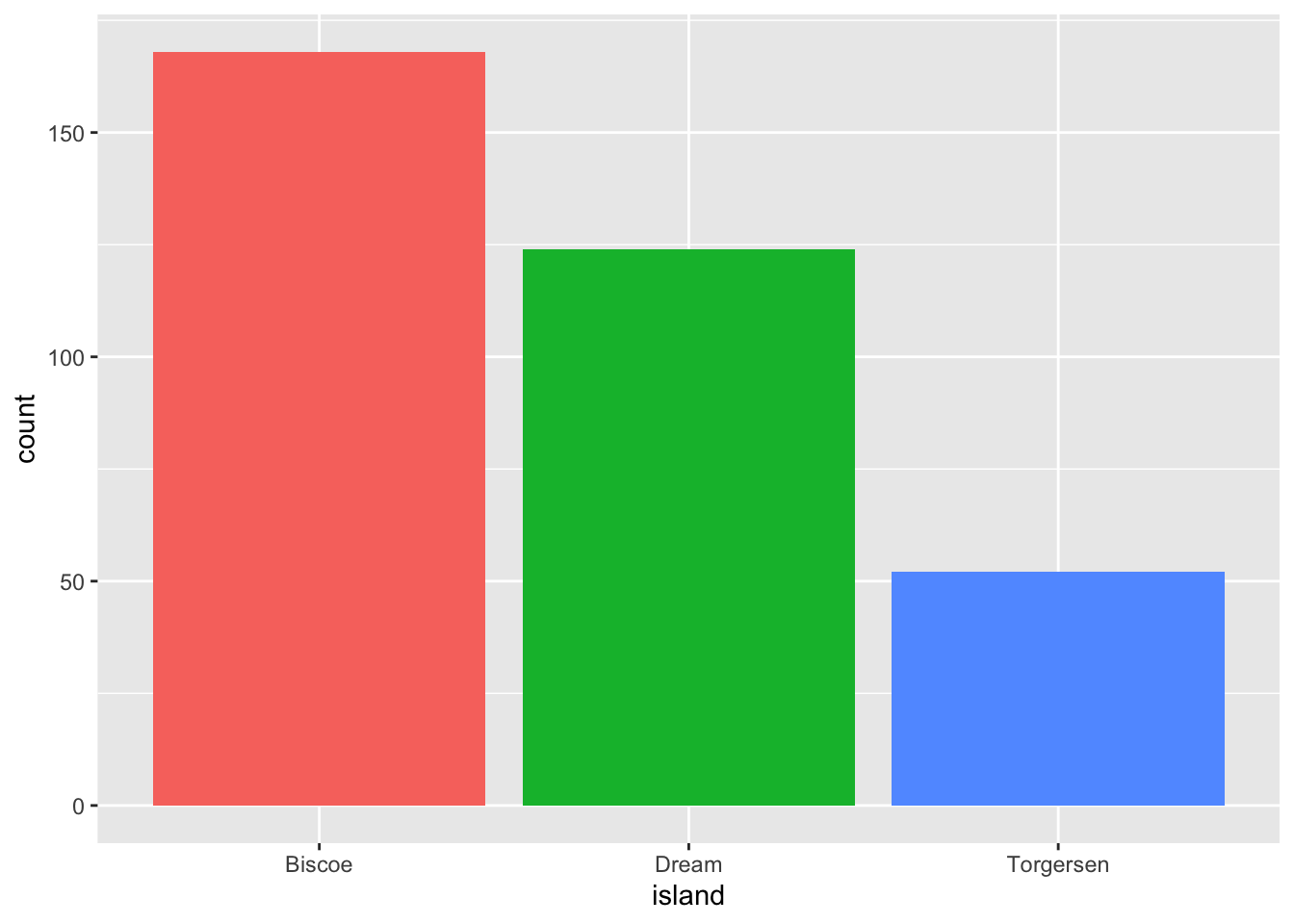
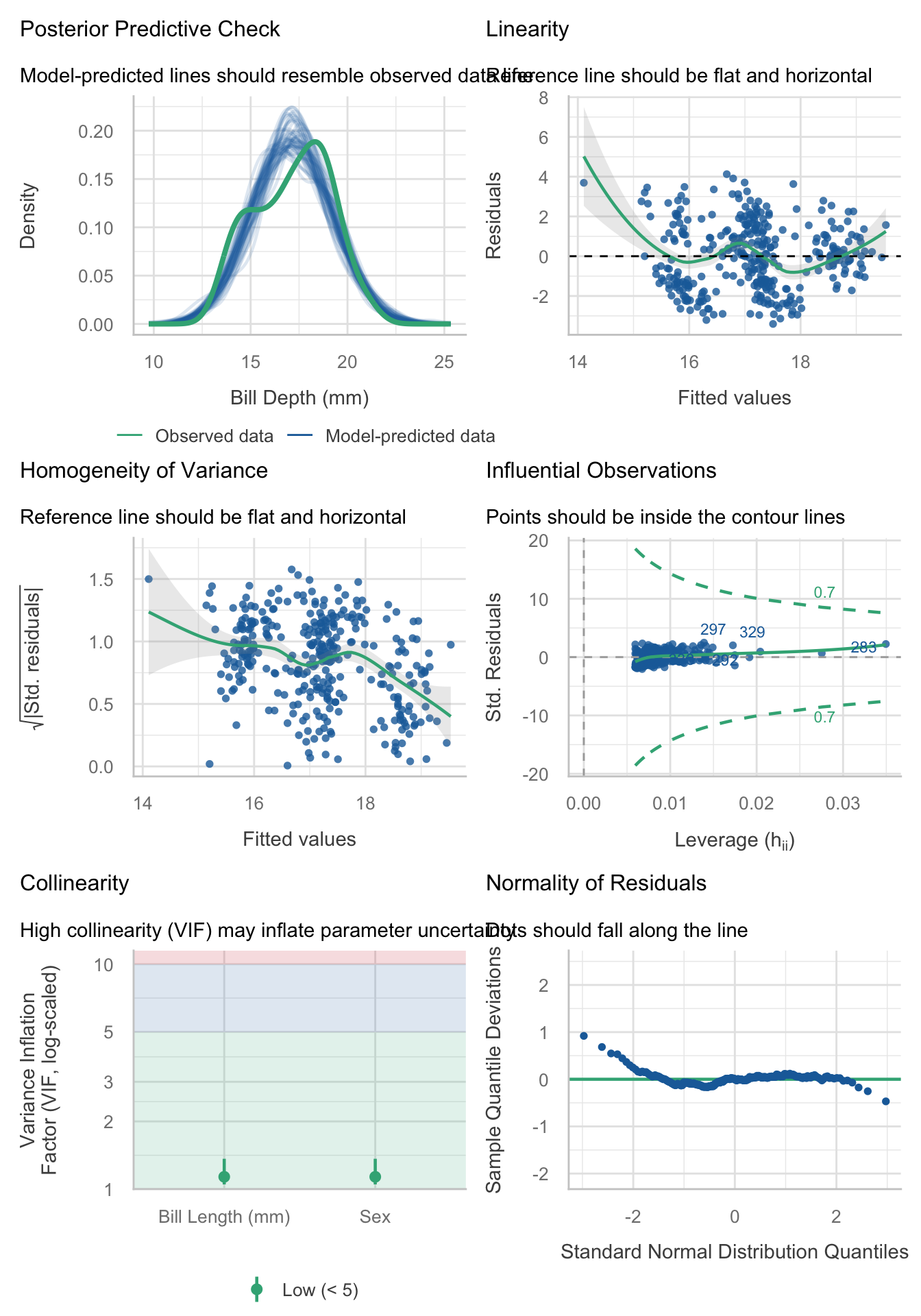
4.3 Resizing your output
Necessary to not make certain plots super squished in your rendered PDF file.
Without resizing.
check_model(model) # from the performance package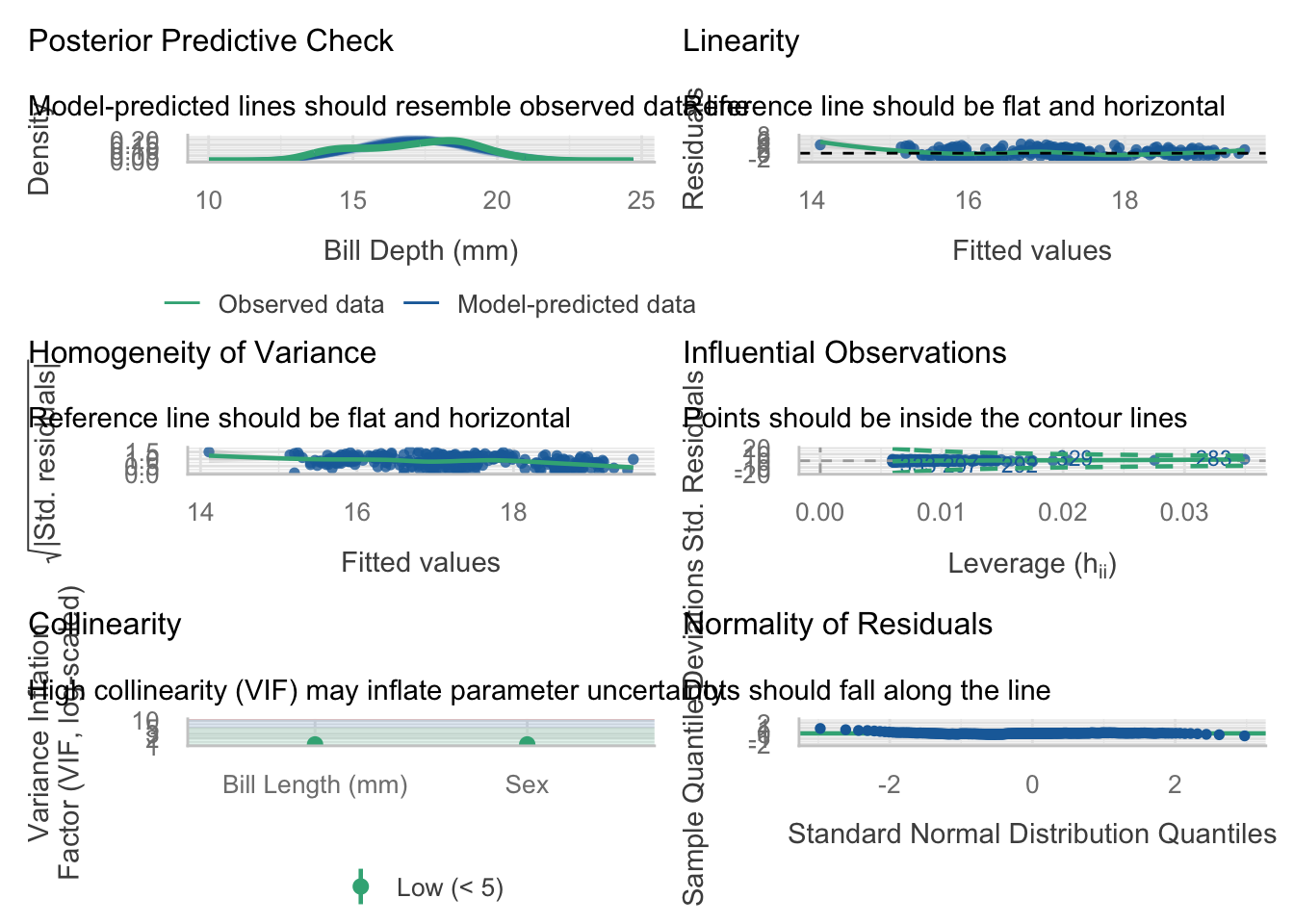
Apply a code chunk option (#|) to resize the height
```{r}
#| fig-height: 10
check_model(model)
```
4.4 Visualizing regression models with forest plots
library(broom)

m1 <- lm(`Bill Depth (mm)` ~ `Bill Length (mm)` + Sex, data = analysis.data)
m2 <- lm(`Bill Depth (mm)` ~ `Bill Length (mm)` + Sex + Species, data = analysis.data)

bind_rows(
  tidy(m1, conf.int = TRUE) |> mutate(model = "Model 1"),
  tidy(m2, conf.int = TRUE) |> mutate(model = "Model 2")
) |>
  filter(term != "(Intercept)") |>
  mutate(term = recode(term,
    "`Bill Length (mm)`" = "Bill Length (mm)",
    "Sexmale"            = "Sex: Male",
    "SpeciesChinstrap"   = "Species: Chinstrap",
    "SpeciesGentoo"      = "Species: Gentoo"
  )) |>
  mutate(term = factor(term, levels = rev(c(
    "Bill Length (mm)",
    "Sex: Male",
    "Species: Chinstrap", "Species: Gentoo"
  )))) |>
  ggplot(aes(x = estimate, y = term,
             xmin = conf.low, xmax = conf.high,
             color = model)) +
  geom_pointrange(position = position_dodge(width = 0.5)) +
  geom_vline(xintercept = 0, linetype = "dashed") +
  labs(x = "Estimate (95% CI)", y = NULL, color = NULL) +
  theme(legend.position = "top")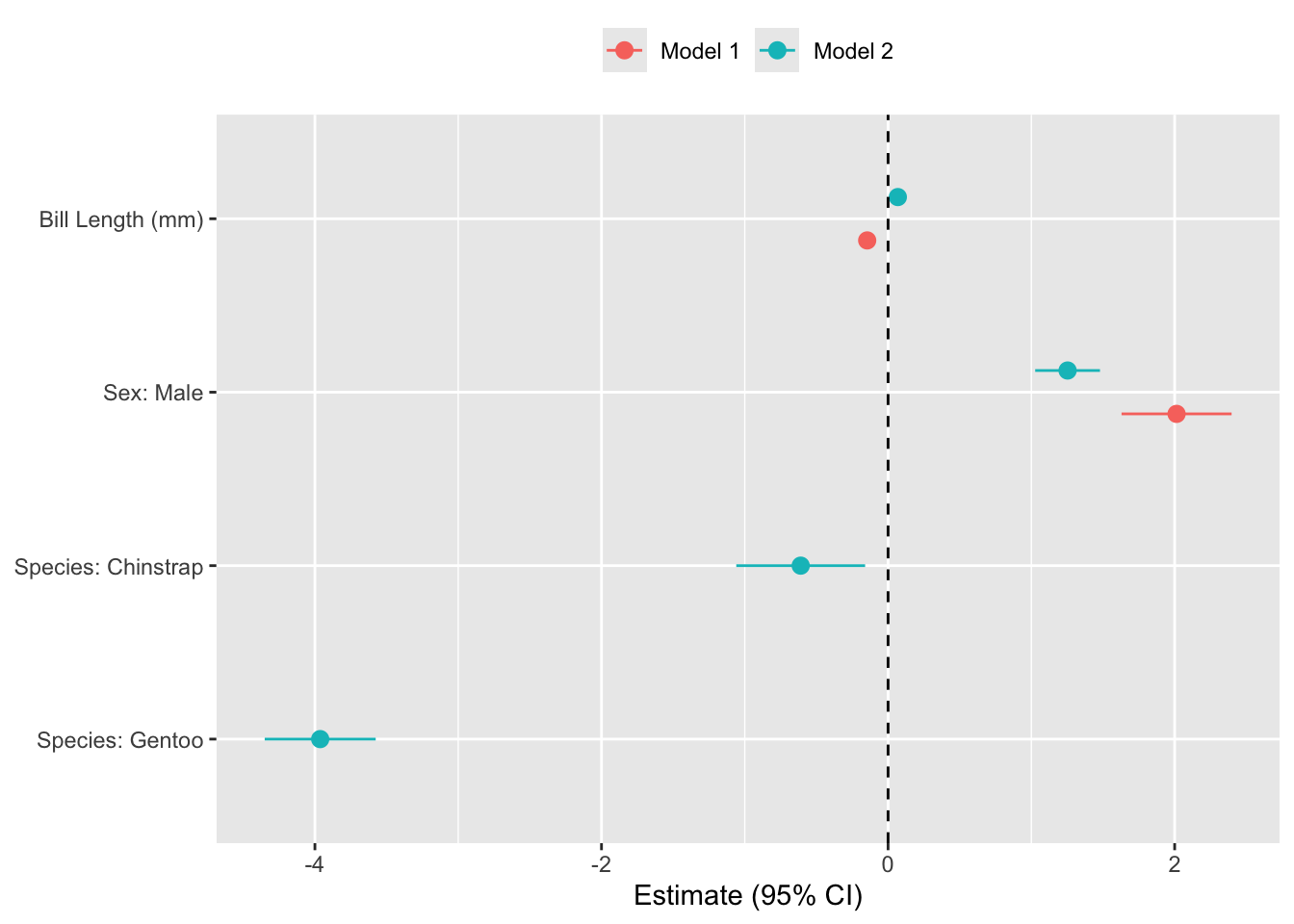
Code Explainer
- Start by saving the results of your models as objects (e.g.
m1andm2). - Extract coefficients CI’s from each model using
broom::tidy(), and specify a unique model name. - Remove the intercept
- Convert variable names (e.g.,
Sexmale) into human-readable labels - Set variable order as an ordered factor in
reverse so the y-axis matches the regression table top-to-bottom. - Plot the estimates on x, variable on y, CI bounds to
xmin/xmax, and color on model. - Plot each estimate as a point with whiskers spanning the CI.
position_dodge()offsets Model 1 and Model 2 vertically so they don’t overlap. - Draw a vertical reference line at zero to make it easy to judge statistical significance.